01
Devices nobody can find
Outstations in the plant room, unit controllers above ceilings, sensors in every room. The points list says what exists. Nothing says where each one is or whether it is finished.


Solutions · BMS
The building management system reaches into every plant room and riser, and it is usually installed by somebody else. Graftix puts the controllers, sensors, valves and meters on the same drawings as the rest of the job, gives the controls contractor the BMS and nothing more, and records how the fire alarm talks to the plant.
The problem
The controls themselves are rarely what goes wrong. What goes wrong is coordination: a specialist working to their own spreadsheets, devices spread across every floor, and a fire interface that the witness test depends on.
01
Outstations in the plant room, unit controllers above ceilings, sensors in every room. The points list says what exists. Nothing says where each one is or whether it is finished.
02
Letting the BMS specialist into the job used to mean letting them see the fire alarm, the budget and the team chat. So nobody did, and their progress arrived by email.
03
Plant shutdown, damper closure and smoke extract on a fire signal get agreed in a meeting, then written down somewhere the witness test cannot find.
On the drawing
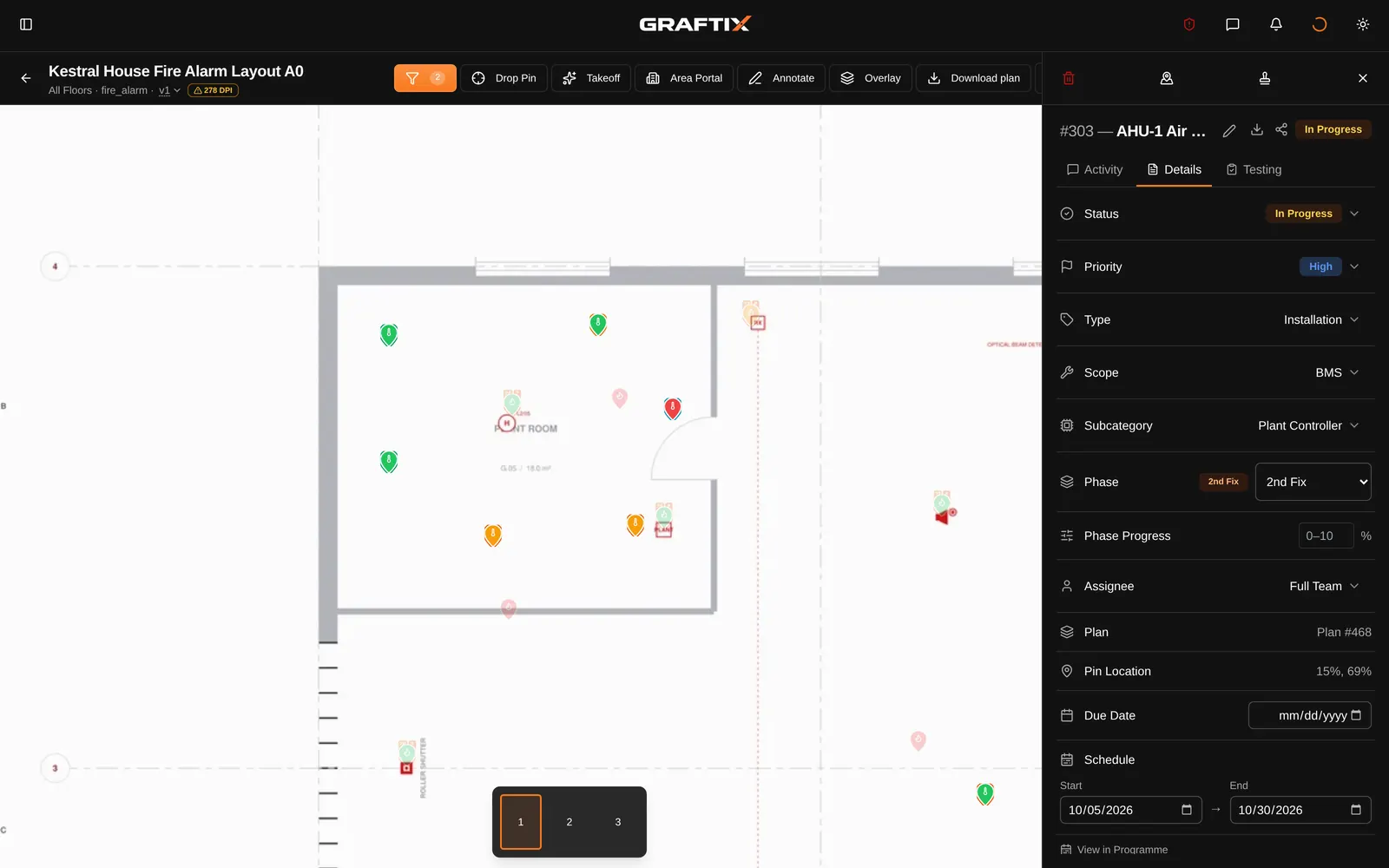
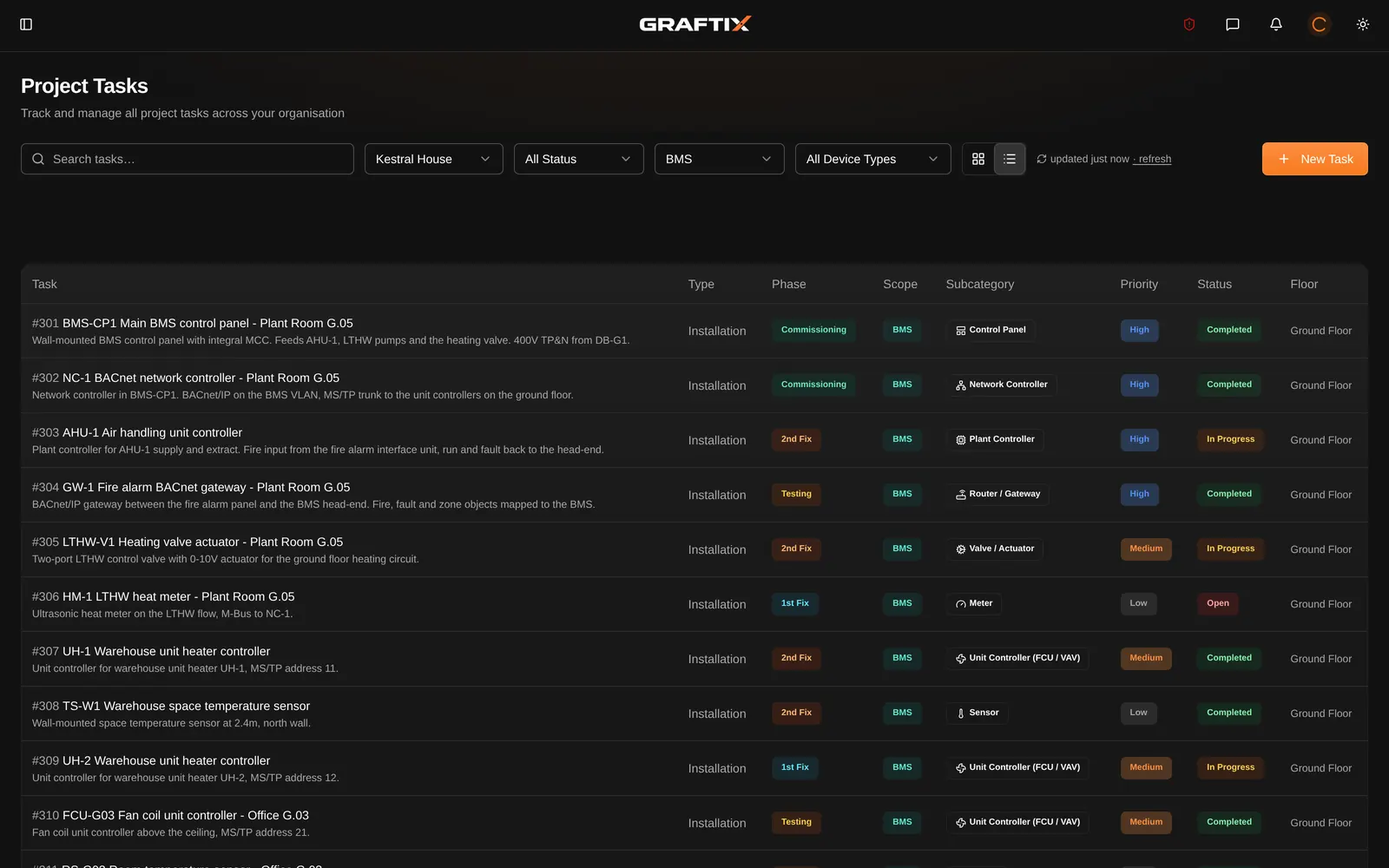
A BMS device is a task like any other, pinned to the drawing with a thermometer in its pin. Status, phase, assignee, photographs, comments and blockers come with it, and the drawing filters down to the BMS when the plant room gets busy.
Controls contractors
Add the controls company to the project as a partner with the BMS scope. Their engineers see the BMS tasks and the drawings those tasks are on, update and add their own work, and never see the fire alarm, the budget or your team's chat.
What you will be asked for
The BMS is signed off with the rest of the building, and the fire strategy is only as good as the interface between them. This is the record that gets asked for.
Device schedules
Every controller, sensor, valve and meter with its type, location and status, matched to the drawing it sits on.
Fire interfaces
How the fire alarm talks to the BMS, hardwired or high level over BACnet or Modbus, with who provides it and who terminates it.
Cause and effect
Shut down plant, close dampers, start smoke extract and start pressurisation as effects in the matrix, witness tested cell by cell.
Site records
Notes and photographs on each device's task, so what was done, by whom and when is on the record.
Blockers
No power to the panel, no access to the plant room: raised against the device and tracked until it is cleared.
Live network status
With Graftix Live, controllers on the building network show online or offline on the drawing, and one that drops off raises an alarm.
On site, offline
Graftix Go carries the BMS tasks and drawings into plant rooms and risers with no signal.
As-built record
Completed BMS work goes into the client's as-built record, and can be shared with them on its own.
Questions
No. BMS is a system in Graftix like the fire alarm or access control. Every project offers it unless someone has narrowed that project's systems, and then it is one switch in the project's settings.
Yes. Add them as a partner with the BMS scope. They see the BMS tasks and the drawings those tasks are on, can update and add BMS tasks, and see their part of the cause and effect read-only. The fire alarm, the budget and your team's chat stay closed to them.
No. The eleven built-in device types belong to no manufacturer, from supervisor and network controller down to sensor, valve and meter. An admin can add your own product ranges beside them, and everyone in your company can then choose them.
In cause and effect. BMS actions such as shut down plant, close dampers and start smoke extract are effects in the matrix, and each interface records whether it is hardwired or high level over BACnet or Modbus, who provides it and who terminates it. Witness tests are recorded cell by cell.
With the Graftix Live add-on, yes. If the building network is managed in ExtremeCloud IQ, add the BMS VLAN and each controller shows online or offline on the drawing, with no agent on site. One that was seen and has dropped off raises an alarm.
Yes. Graftix Go carries the BMS tasks, their device types and the thermometer pins on the drawing. Download the project before you go in and it all works offline, then syncs when you are back in signal.
BMS
Seven days, every feature, no card. Pin one plant room's controllers and give your controls contractor a login that shows them the BMS and nothing else.