Billed monthly
£40
per month, per organisation. Your first user is included.
£20 per additional user, per month
Add and remove seats whenever you like. Removing someone stops their charge from the next invoice.
Start free trial

Pricing
No tiers, no feature gates, no minimum seats and no sales call before you can see the product. You pay for the organisation, then for the people in it.
Billed monthly
£40
per month, per organisation. Your first user is included.
£20 per additional user, per month
Add and remove seats whenever you like. Removing someone stops their charge from the next invoice.
Start free trialBilled yearly · save 17%
£400
per year, per organisation. Your first user is included.
£200 per additional user, per year
The same platform and the same features, for the price of ten months.
Start free trialPrices exclude VAT · 7-day free trial · No credit card required to start
Need help getting set up? See Setup & Support
What it costs in practice
Annual pricing, excluding VAT. The organisation charge covers the platform, the first user, and every module in the catalogue bar the Graftix Live add-on. Operatives and subcontract labour on your register are free: only people who log in count as users.
Small team · 5 users
£1,200
per year
Project team · 15 users
£3,200
per year
Major project · 40 users
£8,200
per year
Large contractor · 100 users
£20,200
per year
Included as standard
Every module in the catalogue is in every subscription, on day one of the trial. Graftix Live is the one add-on.
Unlimited projects
Including parent and child campus structures.
Plans and pins
Full drawing sets, deep zoom, task, RFI and instruction pins, mark-up and AI symbol takeoff.
Task register and kanban
Register and board over the same data, with phases, blockers and custom fields.
Programme
Gantt, estimates and resource allocation.
Purchasing and financials
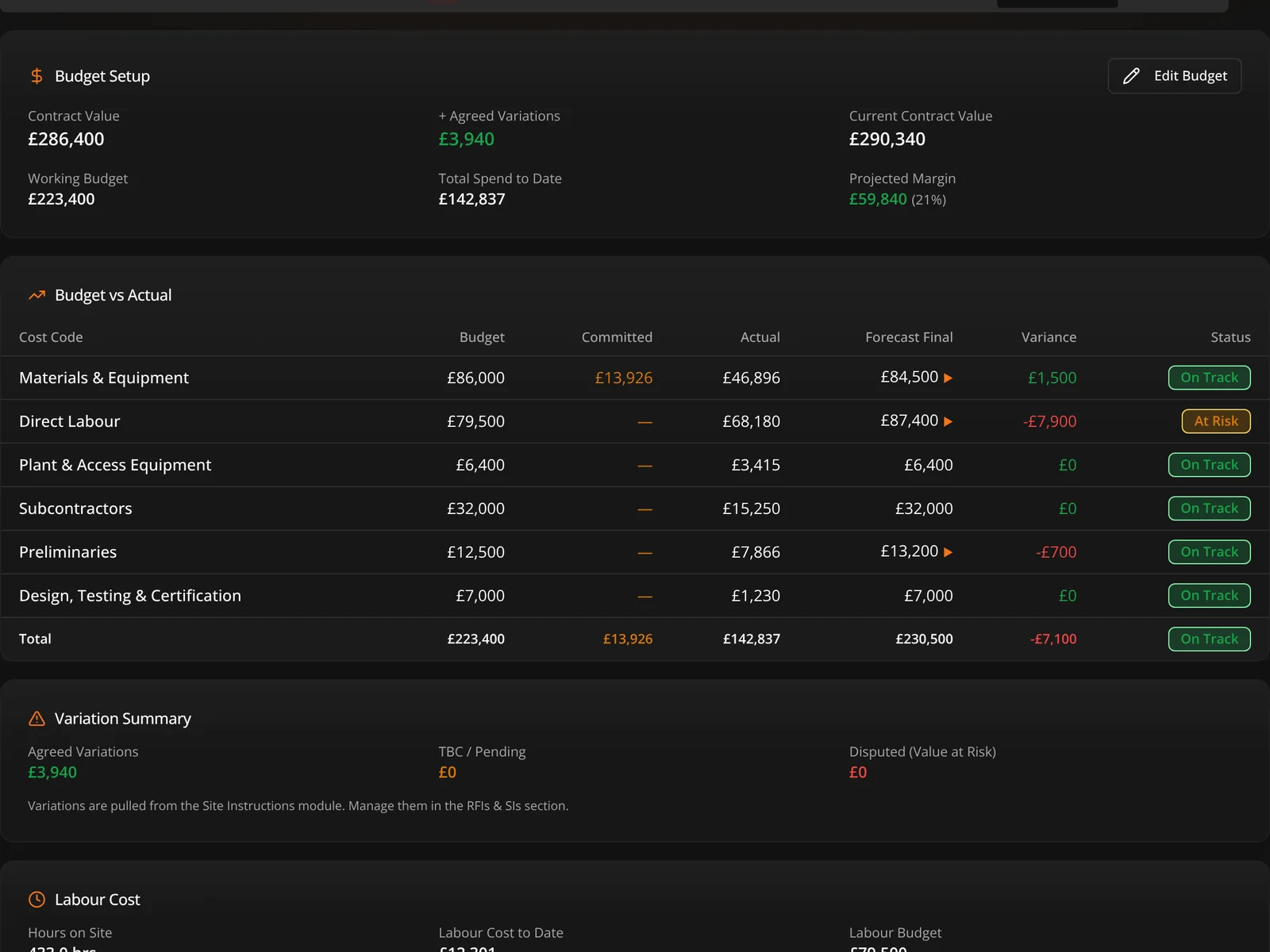
Take-offs, purchase orders, material pools, budgets, cost codes and margin.
RAMS
Drafted with Dave (the AI assistant) or uploaded, then assigned, signed and version-controlled.
Toolbox Talks and Permits to Work
Talks signed on the phone, and permits checked before they are issued.
Inductions and operatives
QR-poster inductions, and a workforce register with qualifications and competency packs.
Incidents, SOS, attendance and plant
Near misses, emergency alerts, geofenced check-in and plant tracking.
eForms
Custom forms with secure external sharing.
Testing and certification
Tests captured on the device, sealed certificates verified by QR, and the O&M pack.
Circuits and schematics
Auto-drawn schematics, riser diagrams and zone charts.
Bid, surveys and proposals
Survey on the drawing, price the design, and send a proposal they accept online.
Operations
Jobs, dispatch, quotes, invoices and stock for service and maintenance.
Reports and Highlight Report
Branded reports from saved templates, and a landscape Highlight Report for directors.
Dave, the AI assistant
Plain-English answers on your live data, included for every user, with action bundles to top up if your team uses it heavily.
Connect your own AI over MCP
Claude and other assistants on your live Graftix data, with tokens you issue and revoke.
Graftix Go native app
For iPhone and iPad, and it keeps working with no signal: optional per-project downloads, and changes that sync themselves when you are back on. Android coming soon.
Installable web app
The full platform on any laptop, desktop or tablet, installed from the browser, with push notifications.
UK data residency
Every organisation's data is held in the United Kingdom. No region to choose, no uplift to pay.
Add-on · Graftix Live
Graftix Live paints the status of the kit you have installed onto your drawings, and gives your client their own view at graftix.live. £10 + VAT per monitored device, per year, so a building with 120 monitored devices is £1,200 + VAT a year. Licensed per project, with a 30-day trial on every project. You or your client can pay. Buy licences online or on invoice — whichever suits.
How Graftix Live works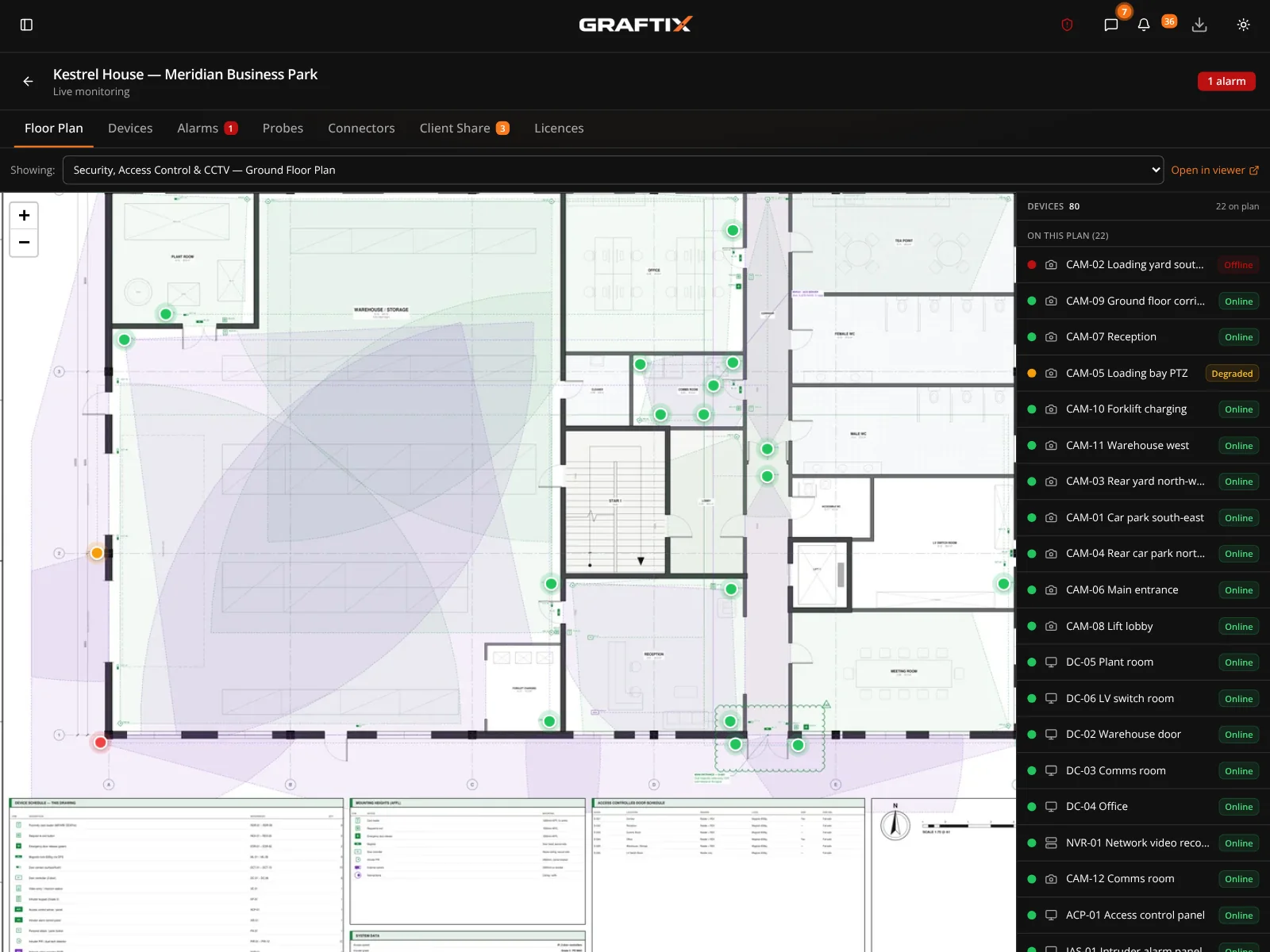
Questions
Is there really no tier system?
No. Every module is included in every subscription. The only variables are how many people log in, and whether you add Graftix Live.
Do I need a card to start the trial?
No. The trial runs for seven days without a card. If you do nothing at the end of it, nothing happens and nothing is charged.
Am I tied into a contract?
Monthly subscriptions can be cancelled at any time. Annual subscriptions run for the year you have paid for.
What happens to my data if I leave?
It is yours. Projects, drawings, certificates and records can be exported before you go. Full detail is in the terms and the privacy notice.
Where is my data held?
In the United Kingdom. Drawings, tasks, photographs, certificates and Vault entries are held on infrastructure in London, whoever you are and wherever you work. Payments are handled by Stripe, and push notifications are delivered through Apple and Google, each covered by ICO-approved transfer safeguards.
Does it work without signal?
Yes. Graftix Go, the native app for iPhone and iPad, is built for it. There is no sync to set up first: what you open is kept on the phone as you work, and for a whole day without signal you can download the full project, then offload it after. Changes made offline send themselves when you are back on. Android is coming soon. Managers on the installed web app are covered too: what they have open stays readable when the Wi-Fi drops, and their changes send when it returns.
Do subcontractors and operatives need a paid seat?
Only people who log in need a seat. Operatives and subcontractors can sit on your register for free with their cards and qualifications, do the site induction from a QR poster, and complete eForms on a secure link, all without an account.
How long does setup take?
An afternoon for a straightforward job: create the organisation and a project, upload a drawing set and start pinning. For a major project we can do it with you, quoted separately: drawings pinned, asset registers imported, tasks structured by trade and your engineers trained on your own job.
Live demo · Before you spend anything
Every module listed above is running right now in a live demo environment, open to anyone, read-only. You do not need the trial to find out whether this fits how you work. You do not even need to give us an email address.
Read-only · No sign-up · A complete demo project
Get started
Put a real job in it and see whether it holds up. That is the only test that matters.