

In development

You are welcome to use it on real jobs. Feedback shapes what gets built next, and beta testers keep their pricing fixed for life.

In development · Beta pricing fixed for life

Tell us what you think

Feature catalogue

Every module. One subscription.

No tiers, no feature gates, no upsell call. Everything below is included from the first day of your trial, whether you are a sole trader with three jobs or running a campus with eighty buildings.

Jump to a module

Live demo · No sign-up

Every module on this page, running on real data

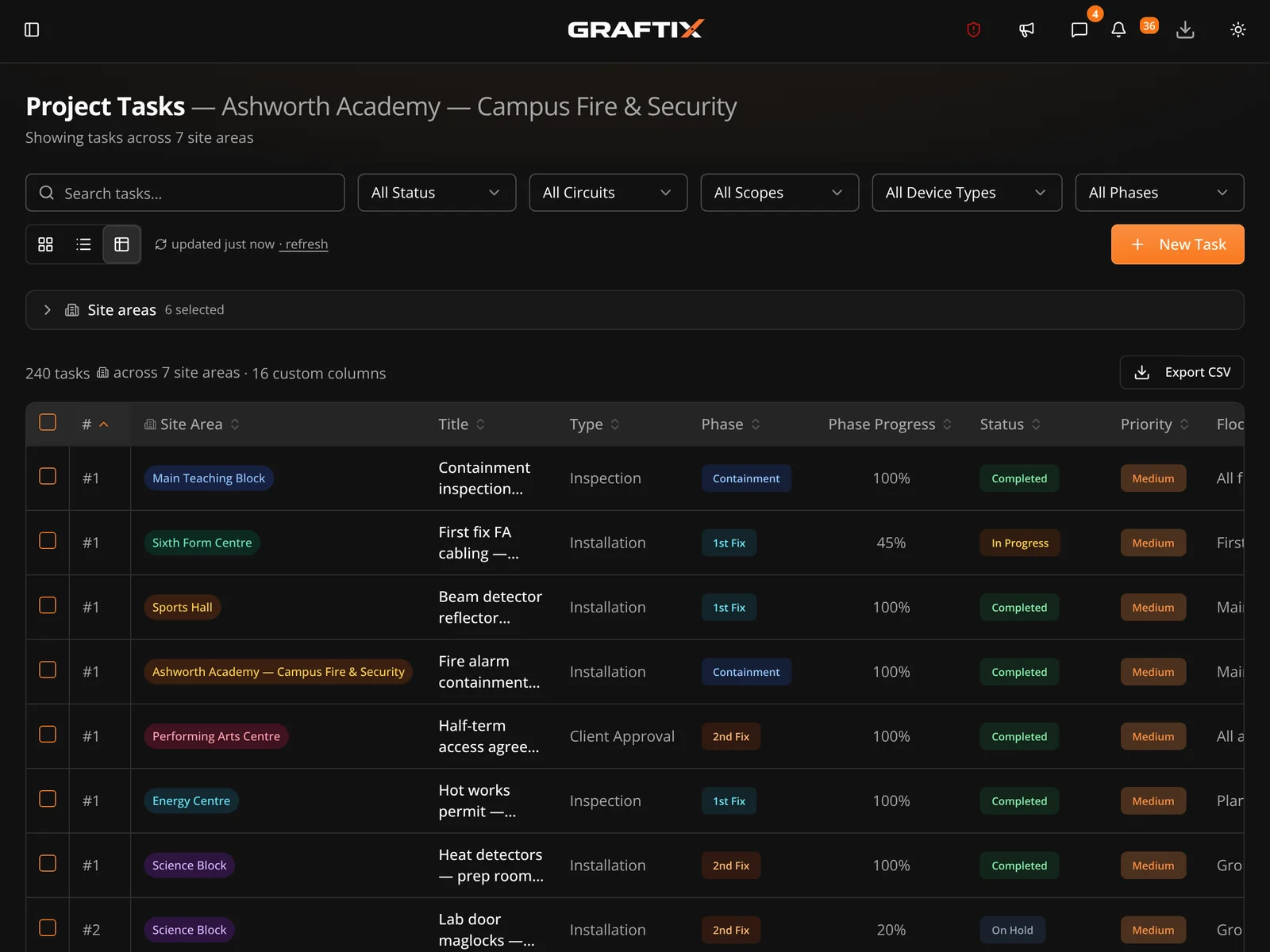
Reading a feature list only gets you so far. There is a live Graftix environment open to anyone, read-only, loaded with a real project. Open the plan viewer, filter the task register, look at a certificate. Then come back and read the rest.

Shot DM2

Live demo, task register at volume

1600 × 1200

01 · Projects and portfolio

From tender to completion

Projects hold everything. Campus jobs get a parent with child sites underneath, so eighty buildings stay one project rather than eighty spreadsheets.

01

Dashboard overview

Portfolio view across every live project: progress, spend, blockers and what needs a decision today.

Creating a project

Set up a job with contract value, client, addresses and team in a couple of minutes.

Project detail

One screen holding tasks, plans, programme, materials, records and financials for that job.

Parent and child projects

Campus mode. A parent project with child sites per building, block or zone, rolling up automatically.

Team and roles

Role-based access so engineers see their work and directors see the whole business.

Custom status labels

Rename statuses and task types to the words your business already uses on site.

02 · Task register

Granular enough to trust

A spreadsheet-style register and a kanban board over the same data. Filter by trade, floor, phase or engineer and the picture changes instantly.

02

Task register

Spreadsheet-style view built for volume. Thousands of devices, sorted and filtered like you would in Excel.

Workflow status and phase

Statuses that match site reality, plus installation phase and phase progress on every task.

Task blockers

Log what is stopping work, who owns it, and when it was released. An audit trail for every delay.

File attachments

Photos, datasheets and markups attached to the task rather than sitting in someone's camera roll.

Custom fields

Device address, cable reference, loop number, whatever your job needs. Searchable across the project.

Kanban board

Drag tasks between statuses when a board reads better than a register.

Progress tracking

Completion by trade, floor and phase, calculated from the tasks themselves rather than a guess.

Dependencies

Link tasks that cannot start until something else is finished, and see the knock-on immediately.

03 · Plan viewer and annotations

The drawing is the interface

Upload the drawing set, pin the work where it actually is, and let the plan carry the project. This is the part people switch for.

03

Uploading plans

Drop in a PDF drawing set. Tiled server-side so a full A0 sheet opens instantly on a phone.

Navigating the viewer

Deep zoom, pan and layer control that behaves the way engineers expect a drawing to behave.

Pinning tasks to plans

Every task can live at a coordinate on a sheet. No more describing which riser you meant.

RFI and SI pins

Raise a query or an instruction against the exact location it concerns, not the project in general.

Area portal pins

Jump from an overall site plan straight into the drawing for that building, floor or zone.

Annotations

Mark up the drawing directly. Notes and clouds stay with the sheet for everyone who opens it.

AI symbol takeoff

Train on a symbol once, then count it across the whole set. Quantification in minutes, not a weekend.

Organisational symbol library

Symbols you have trained are saved for the business, so the next project starts already knowing them.

04 · Programme

A programme built from real tasks

The Gantt is generated from the same tasks your engineers are working through, so the programme and the site cannot quietly drift apart.

04

Programme overview

Gantt view with phases, start and end dates, and durations drawn straight from the task register.

Estimates and headcount

Duration, unit and required headcount per task, so the programme reflects the labour you actually have.

Resource allocation

See who is committed to what across the project before you promise a client a date.

05 · Purchasing and materials

Know where every unit went

From take-off to purchase order to the task that consumed the kit. The pool decrements itself, so the number on screen is the number in the container.

05

Take-off lists

Bills of quantity built from the drawing, ready to price or turn straight into an order.

Raising a purchase order

Raise, issue and track POs against the project, with delivery status visible to the site team.

Supplier management

A supplier directory held at organisation level, reusable across every project you run.

Kit list

The site materials register. What has landed, what is left, and what has already been fitted.

Material pool

Pools that auto-decrement as tasks claim from them, with every claim logged against a task.

Plant track

Plant and equipment register covering what is on hire, where it is and when it is due back.

06 · Financial management

Margin you can see while the job is live

Contract value, working budget, cost codes and direct costs on every project, rolled up into a portfolio view across the business.

06

Budget and contract value

Set the contract value and working budget, then watch committed cost move against it.

Cost codes

Break the budget down the way your accountant wants it, not the way an app decided.

Direct cost entries

Log costs that fall outside purchasing so the picture stays complete.

Materials and labour aggregation

Material spend and labour pulled together automatically from what the project already recorded.

Portfolio financials

Every live project on one screen. Which job is carrying the business and which one is quietly bleeding.

Site instructions and variations

Instructions and variations logged, costed and evidenced, because this is where margin is usually lost.

07 · Safety and compliance

Audit-ready without the panic

The records an inspector, a principal contractor or a client will ask for, captured on site at the moment they happen and filed against the job automatically.

07

RAMS

Risk assessments and method statements issued, read and signed off digitally, with version control.

Certificates

Electrical, fire and compliance certificates held against the project and exportable as clean PDFs.

Attendance

Check in and out on site. See who is on site right now, and export the history when payroll asks.

Incidents

Incident and near-miss reporting with photos, witnesses and follow-up actions tracked to closure.

SOS alerts

An emergency alert from the app for lone workers, escalated to the people who need to know.

Asset register

What was installed, where, with serials and warranty dates. The start of every maintenance contract.

08 · eForms

Your paperwork, your wording

Build the forms your business actually uses, publish them, and share them outside the organisation on a secure link when a client or subcontractor needs to complete one.

08

Building an eForm

Drag together the fields you need for inspections, permits, checklists and sign-offs.

Publishing and external access

Share a form on a secure external link so people outside the business can complete it without an account.

Reviewing submissions

Every submission held against the project, reviewable and exportable when the evidence is needed.

09 · Communication

Decisions on the record

Questions, instructions and submittals against the job rather than in a group chat that nobody can search in eighteen months when it matters.

09

RFI management

Raise, track and close requests for information, pinned to the drawing where relevant.

Technical submittals

An organisation-wide catalogue of product data sheets, attached to the tasks they apply to.

In-app chat

Conversation that stays with the project and is still there long after the job finishes.

In-app notifications

What changed, what needs you, and what is now blocked, without opening every project.

Push notifications

Alerts on the phone for the things that genuinely cannot wait until someone opens a laptop.

Email notifications

Digest and event emails for the people who live in their inbox rather than the app.

10 · AI and platform

Useful AI, not a chatbot in the corner

Dave answers questions about your live project data in plain English. Symbol takeoff counts your drawings. Both do work you would otherwise pay someone to do.

10

Dave AI assistant

Ask about your own live project data in plain English and get an answer, not a search result.

AI symbol takeoff

Automated device counting across a drawing set, reviewable before anything is committed.

Works offline

Full offline capability for the parts of site where there is no signal and never will be.

Install as an app

A progressive web app you can install on iPhone or Android and use like any other app on the phone.

Data residency and security

Choose where your organisation's data lives, with tenant isolation enforced at the database.

Subscription and billing

Manage seats and billing yourself. Add a user when you hire, remove one when you do not.

11 · Reporting and secure storage

The two nobody expects

Both of these exist because a live job needed them. Neither is standard in a field management platform, and one of them is the reason security engineers stop keeping passwords in a group chat.

11

Reports

Send the client a document, not a screenshot

Configure a report once, save it as a template, and re-run it whenever you need it. Choose what goes in and who it goes to, then generate a PDF or have it emailed the moment it is finished.

  • Filter by status, trade, assignee or drawing
  • Plan mini-maps showing exactly where each task sits
  • Full-size landscape plan pages where you need the detail
  • Photos, comments and blockers carried through per task
  • Trade headers, contents page, page numbers, one task per page
  • Emailed to any recipient list on completion

The Vault

Credentials that stop living in a group chat

Panel codes, controller logins, licence keys, engineer passwords. Encrypted against a password you set, and shared with the people on the job who actually need them.

AES-256-GCM · Zero knowledge

  • Encrypted under a password you create, per project
  • Share access with named people in your organisation
  • Graftix cannot read your entries. There is no key on our side.
  • Built for jobs running several commissioning engineers
  • Because a spreadsheet called passwords.xlsx is not a control

All of it, included

Try the whole thing. Free.

Every module on this page is in the trial. Upload a drawing, pin some tasks, and see whether it fits how you actually work.